 GamesPK
How to Register on GamesPK
No APK to trace here — GamesPK runs as a browser-based platform. The registration steps are simple. What actually deserves a full page is the operator's own habit of spelling its name across four different domains.
Open a link you've verified
The buttons on this guide point to GamesPK's own registration page. See the domain table below before typing the name into a search engine yourself — a search for a brand name in this category can surface lookalike pages just as easily as the real one.
Fill the Register form
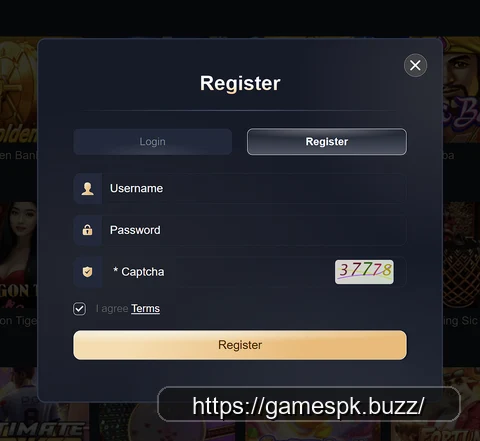
Username, password, and a captcha — that's the entire form, confirmed directly from the app's own popup. No email, no phone-number verification step, and no personal ID fields appear at this stage.
Agree to Terms and submit
A checkbox confirms you've agreed to the platform's Terms before the Register button becomes active. Worth actually reading that Terms link once, particularly the sections on withdrawal conditions and bonus wagering, rather than checking the box on autopilot.
Deposit and claim the bonus ladder
Pehla/Dusra/Teesra deposit bonuses (128%/68%/48%) apply to your first three deposits — see the full bonus breakdown for what the banner does and doesn't state about wagering requirements.
What the Register Form Actually Asks For
Three fields, confirmed directly from the app's own popup shown above: Username, Password, and a numeric Captcha. That's a notably minimal signup compared to platforms in this category that require phone-number OTP verification or ID document upload just to create an account — GamesPK's own form doesn't ask for either at the registration stage. A "Login" tab sits right next to "Register" in the same popup, meaning returning players use the same modal rather than a separate page. Whatever payment method verification exists (JazzCash, Easypaisa, or similar mobile-wallet linking, standard across this app category) would happen later, at the deposit stage rather than registration — this guide didn't get a screenshot of that specific step, so it isn't described here as confirmed.
Which Domain to Trust — GamesPK Uses at Least 4
This is worth reading before you register anywhere. GamesPK's own materials spell its name across four different domains, each seen directly on the operator's own screens or links — not found by searching around, but read directly off the app's own splash screen, header, banner artwork, and this guide's own referral link:
| Domain | Where it's seen |
|---|---|
| gamespk.com | The lobby header's own subtitle branding ("GAMESPK — gamespk.com") |
| gamespk.vip | The app's own loading/splash screen wordmark ("GAMESPK.VIP") |
| gamespk.club | A badge printed directly inside the in-app promo banner artwork |
| 32gamespk.com | The actual registration URL this guide's own referral link points to |
Four spellings from one operator's own materials is a lot, and it isn't unique to GamesPK — this same pattern has shown up on other platforms in this exact app category, where the operator's promotional screens, splash art, and referral infrastructure each carry a slightly different domain. The likely practical reason is resilience: gambling-adjacent domains get blocked, reported, or deindexed more often than typical websites, so operators in this category commonly run several live domains in parallel and rotate which one gets promoted, so that losing access to any single one doesn't take the whole platform offline.
Payment Safety Basics
Never share your account password, wallet PIN, or the captcha/OTP from your registration step with anyone claiming to be platform support. Legitimate support doesn't need your credentials to help you — treat any request for them as an immediate red flag regardless of which of the domains above is asking.
A few additional habits worth building, common sense across this entire app category and not specific to GamesPK: use a password you don't reuse anywhere else, since a breach on one gaming platform shouldn't be able to unlock your bank app or email. Screenshot or otherwise record your username and the domain you registered on the day you sign up — with four legitimate domain spellings in circulation, it's easy to forget which one you actually used weeks later. And treat any unsolicited message claiming to be from GamesPK "support" asking you to click a link or share account details with the same suspicion you'd apply to any other unsolicited financial message.